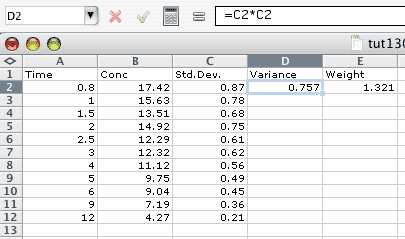
Figure 13.2.1t Spreadsheet with the Data entered. Note the formula for Variance
| Boomer Manual and Download | ||
| PharmPK Listserv and other PK Resources | ||
| Course Index | ||
 Enter description for this analysis: Entering Weight with Data

 Enter data from

 0) Disk file      2) ...including weights
 1) Keyboard       3) ...including weights

 Enter Choice (0-3) 3

 Enter data for [Drug]
      Enter x-value (time) = -1 to finish data entry


 X-value (time) 0.5
 Y-value (concentration) 83.4
 Wt-value 8.1

 X-value (time) 1.0
 Y-value (concentration) 74.5
 Wt-value 7.2

 ... (more data here)

  X-value (time) 6
 Y-value (concentration) 31.2
 Wt-value 2.9

 X-value (time) -1
And the .bat entries look like:
Entering Weight with Data
    3                             Data from disk or keyboard
   .5000                          X value
   83.40                          Y value
   8.100                          Wt value
   1.000                          X value
   74.50                          Y value
   7.200                          Wt value

...

   6.000                          X value
   31.20                          Y value
   2.900                          Wt value
  -1.000                          X value
Don't forget to remove the weight question lines (marked in red) later in the bat file.
    0                             Continue or save data
    2                             Weight type
    2                             Weight type
    2                             Weight type
    0                             AUC line number
The weight values entered above can be calculated as 1/(variance) = 1/(standard deviation)2 using a calculator or spreadsheet.
Figure 13.2.1t Spreadsheet with the Data entered. Note the formula for Variance
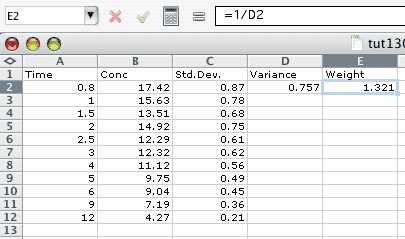
Figure 13.2.2t Spreadsheet with the Data entered. Note the formula for Weight
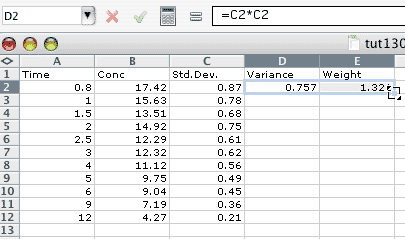
Figure 13.2.3t Spreadsheet with two cells highlighted before Fill Down
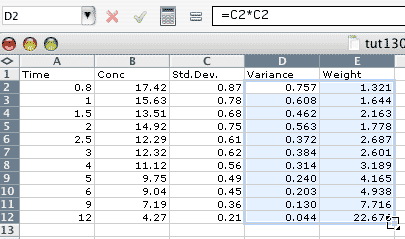
Figure 13.2.4t Spreadsheet with cells highlighted after Fill Down
P.S. You can download my Excel Spreadsheet here.