
Figure 8.4.1 Initial SAAM II window
| Boomer Manual and Download | ||||
| PharmPK Listserv and other PK Resources | ||||
| Previous Page | Course Index | Next Page | ||
SAAM II is an event driven program which means that once you start the program you make selections from the graphical user interface or the menus to make option selections, enter data or initial parameter values. The main program window includes panels for making model and experiment selections and panel for drawing the model.
Figure 8.4.1 Initial SAAM II window
The model is drawn by selecting first a circle (compartment) and then an arrow (rate constant). Next the experiment is specified in terms of duration and time units, dose and sample points.

Figure 8.4.2 The SAAM II window after the model is drawn
Double clicking on the syringe allows the specification of the dose. Double clicking on the sampling.

Figure 8.4.3 Specifying the dosage regimen
Double clicking on the sample allows the specification of the sample. Note the equation for s1 is q1/V. q1 is the amount in the compartment and V is apparent volume of distribution.
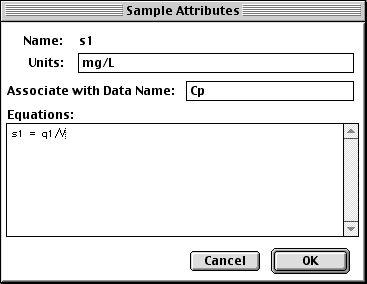
Figure 8.4.4 Specifying the sample
Show/Data, Show/Parameters and Show/Plot menu items allow the specification of the data, initial parameter values and plot specifications. The next step is to select the menu items Compute/Solve to use the initial estimates and Compute/Fit to calculate the best fit value.
Refer to the SAAM II website for more details.
iBook and pdf versions of this material and other PK material is available
Copyright © 2001-2022 David W. A. Bourne (david@boomer.org)